Stay Connected: Google Maps Now Lets You Share Live Location Easily!
 Facebook
 Twitter
 LinkedIn
 WhatsApp
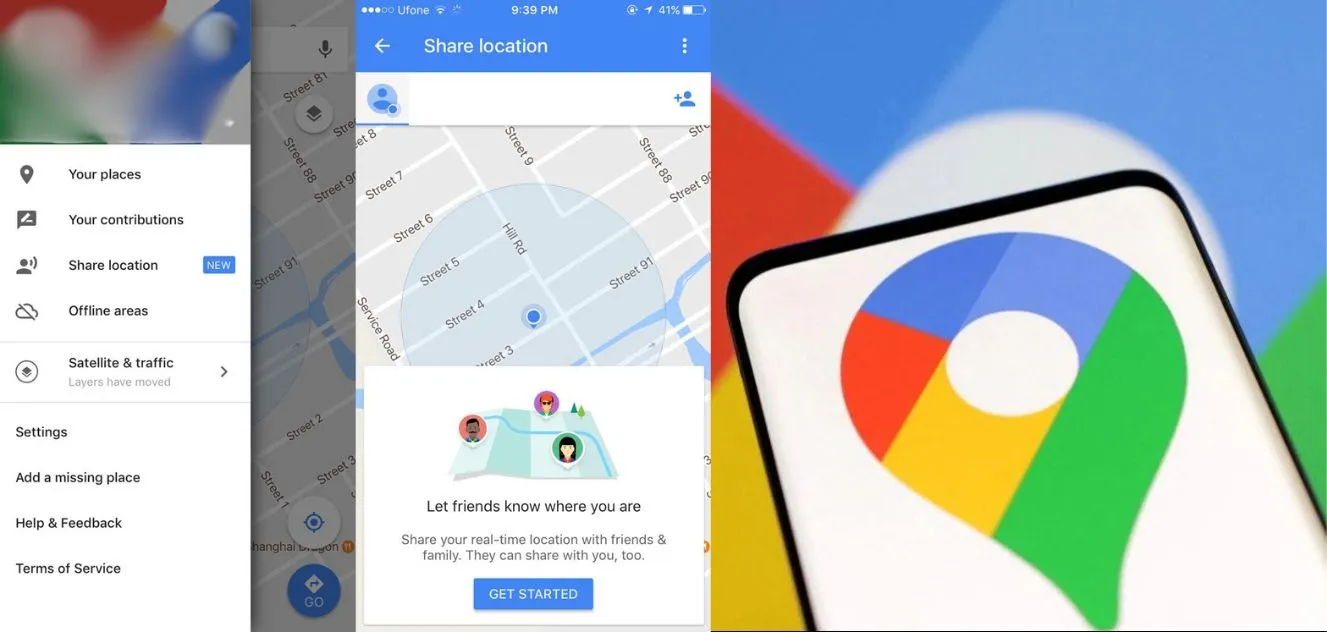
Have you heard the news? Google Maps has just released a fantastic feature that makes staying in touch a breeze. You may now share your current location with friends and family, just like you can on WhatsApp or Telegram. You can also include information such as your phone's battery level and whether it is charging. And, get this, it even displays you the approximate time it will take you to get to your destination if you're on the go. Here's how to make the most of this handy tool.
We all know Google Maps is the superstar when it comes to finding our way around. But now, it's not just about directions; it's about keeping your folks in the loop too. So, let's dive into how you can use this live location-sharing magic.
How to Share Your Live Location:
1. Open Up Google Maps : Open the Google Maps app on your phone. See that little person icon up on the top right? Tap on it.
2. Go to Location Sharing : Once you've tapped the person icon, you'll see an option that says 'Location Sharing.' Give that a tap too.
3. Hit Share Location : Now, you're in the sharing zone. Press the 'Share Location' button, and a new window will appear.
4. Set the Time : Here's the fun part. You can choose how long you want to share your location – it could be for a set time or until you decide to turn it off. You can even share the link with others so they can track your journey.
5. Stopping the Sharing Party : If you're ready to wrap up the location-sharing fiesta, just head back to Maps, tap on 'Sharing via link,' and hit the 'Stop' button. Easy peasy!
Unlike some other apps where you can only share your whereabouts within the app, Google Maps lets you send your location to other apps too. Cool, right? And the best part – this feature works even if you've turned off 'Location History.' So, you've got the flexibility to share your adventure wherever you go.
Now, why is this a game-changer? Well, besides being super handy, Google Maps comes pre-loaded on most Android phones, and lots of iPhone users swear by it too. So, it's a win-win for keeping everyone in the loop, no matter the device.
Just a heads up – this feature isn't available for kiddos under 13 in India, and it won't work with certain Google Workspace accounts. Oh, and if you're using Google Maps Go, you'll have to wait a bit for this cool update.
So, there you have it – the lowdown on Google Maps' new live location-sharing feature. Stay connected, stay informed, and make your journeys even more awesome!